
À propos de Text to MP3 Converter Free Edition
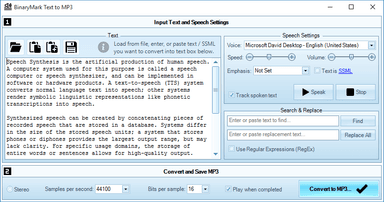
Text to MP3 Converter Free Edition est une application Windows actuelle disponible dans le catalogue communautaire WinGet. Quickly convert text, word, pdf, and other documents to speech and save results to MP3 files using Windows Text-to-Speech Engine and voice synthesizer. - Supports multiple languages* - Synthesizes speech using configurable voice* - Voice control options include speaker's gender, tempo, speed, emphasis, and volume - Records and outputs either wav or mp3 files - One or two audio channels: mono / stereo output - Control recorded sound quality using effective bit rate: bits per sample and samples per second settings - Can open and read most text documents in most encodings - Can read documents in doc, rtf, and pdf formats** - Automatically improves and fixes text to make it compatible with speech synthesis (for example it can remove hyphenation) - Can use any of the installed Text-to-Speech voices - Uses Microsoft Speech Synthesizer available with Windows - Text-to-Speech (TTS) engine supports Speech Synthesis Markup Language (SSML) * Voices and language support varies depending on your version of Windows and installed speech languages. ** Word, pdf, rtf, and other documents may need to be opened in their respective programs depending on the exact format version and features used.
Page source d’origineFonctions principales
Nouveautés
- Current WinGet catalog version: 2.0
Configuration requise
- Windows 10 or Windows 11
- WinGet or the publisher installer
Commentaires
Aucun commentaire pour le moment.