
About Text to MP3 Converter Free Edition
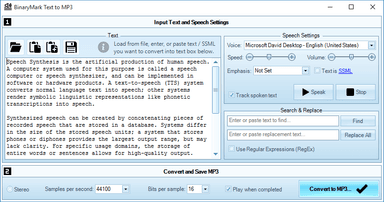
Text to MP3 Converter Free Edition is a current Windows application available through the WinGet community catalog. Quickly convert text, word, pdf, and other documents to speech and save results to MP3 files using Windows Text-to-Speech Engine and voice synthesizer. - Supports multiple languages* - Synthesizes speech using configurable voice* - Voice control options include speaker's gender, tempo, speed, emphasis, and volume - Records and outputs either wav or mp3 files - One or two audio channels: mono / stereo output - Control recorded sound quality using effective bit rate: bits per sample and samples per second settings - Can open and read most text documents in most encodings - Can read documents in doc, rtf, and pdf formats** - Automatically improves and fixes text to make it compatible with speech synthesis (for example it can remove hyphenation) - Can use any of the installed Text-to-Speech voices - Uses Microsoft Speech Synthesizer available with Windows - Text-to-Speech (TTS) engine supports Speech Synthesis Markup Language (SSML) * Voices and language support varies depending on your version of Windows and installed speech languages. ** Word, pdf, rtf, and other documents may need to be opened in their respective programs depending on the exact format version and features used.
Original source pageWhat makes it useful
What’s new
- Current WinGet catalog version: 2.0
System requirements
- Windows 10 or Windows 11
- WinGet or the publisher installer
Comments
No comments yet. Be the first to comment.